Saturday, 25 April 2015

The database you are connecting is with non-AL32UTF8 character set. Oracle strongly recommends using AL32UTF8 as the database character set.

When i was running rcu for obiee,it got failed with below error .

RCU (Repositary Creation Utility)
---------------------------------------
This utility is used to create schema's in the database for fusion middleware products
like SOA,WEBCENTER,OEP,OSB and OBIEE etc
Error
==
The database you are connecting is with non-AL32UTF8 character set. Oracle strongly recommends using AL32UTF8 as the database character set.

Screen Shot
----------


Solution
---------------
Check the database character set using below query .


While installing you have choosen wrong character set ,Please drop the database and create
new database and don't forget to select "AL32UTF8" Character set .


Once the database installation got finished ,invoke rcu it will run smoothly .


Thanks for visiting my blog ...


How to drop the database in Oracle?

We can drop the database in three ways .
1) dbca
2)drop database
3)Manually removing the files using rm command ...


Let's see how to drop the database using "DBCA"
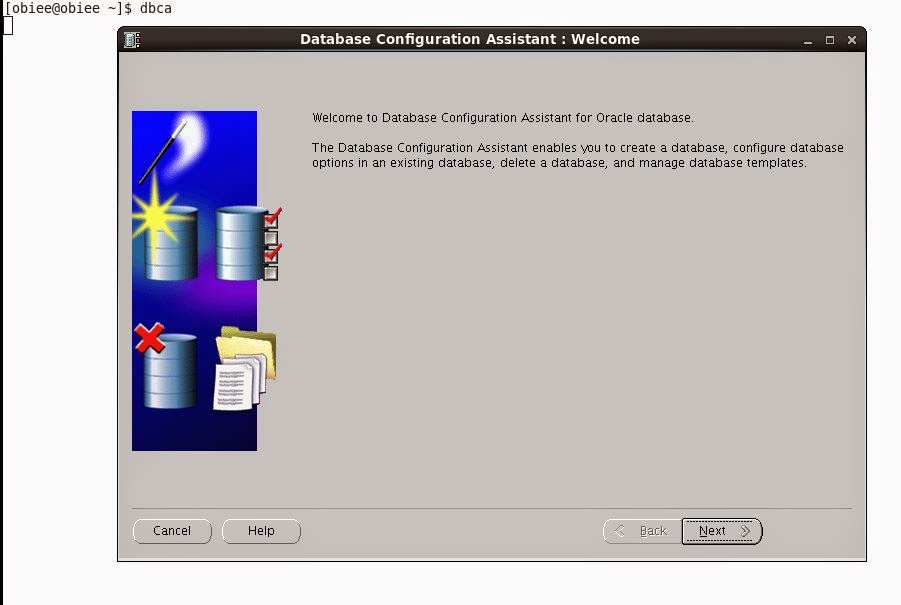
Source the environment and fire dbca,It will launch the below screen .


Select the operation which you want to do it .
In my case , i am deleting the database .


Select the name of the database which want to delete it .


It is taking for a message saying .if you click on "YES" all the data will be deleted .
Click on yes and proceed .


 It will take sometime to delete the data .


If a cron job is failing , it has to send a mail to my email address !.


$ crontab -l
05 20 * * *  /home/oracle/scripts/backup.sh   PROD level0


I have schedule the rman backup in crontab which is mentioned above and it is not triggering the database backup .I want ,If a cronjob is failing,it has to send a mail to my email address.

$ crontab -l
MAILTO=abdul.wasiq01@gmail.com
05 20 * * *  /home/oracle/scripts/backup.sh   PROD level0


When i used above function it has through mail my email address saying
"/bin/sh: /home/oracle/scripts/backup.sh: /bin/ksh: bad interpreter: No such file or directory"


 In the crontab ,it was using Korn shell instead or bash .
Now i have slightly change the crontab

$crontab
MAILTO=abdul.wasiq01@gmail.com
05 20 * * * /bin/bash /home/oracle/scripts/backup.sh PROD level0

Now the backup triggered successfully and got completed .

Monday, 13 April 2015

EBS R12.2 OS ENVIRONMENT VARIABLES

$ echo $FILE_EDITION
<shows which file edition you are using, run or patch>

$ echo $RUN_BASE
<shows absolute path to run file system>

$ echo $PATCH_BASE
<shows absolute path to patch file system>

$ echo $NE_BASE
<shows absolute path to non-edition file system>

$ echo $APPL_TOP_NE
<non-editioned appl_top path. Equivalent to $NE_BASE/EBSapps/appl>

$ echo $LOG_HOME
<Application Instance Specific Log Directory>

$ echo $ADOP_LOG_HOME
<Online patching Specific Log Directory. Equivalent to $NE_BASE/EBSapps/log/adop>

$ echo $IAS_ORACLE_HOME
<FMW Web Tier Home Directory>

$ echo $ORACLE_HOME
< 10.1.2 ORACLE_HOME>

$ echo $CONTEXT_FILE
<Source for information populating template files (autoconfig)>

$ echo $EBS_DOMAIN_HOME
<WLS Deployment of Oracle E-Business Suite 12.2 Domain (instance specific)>

$ echo $ADMIN_SCRIPTS_HOME
<Shell scripts to control processes associated to the Applications Instance>

$ echo $EBS_ORACLE_HOME
<Oracle E-Business Suite 12.2 FMW Deployment directory>

$ echo $RW
<10.1.2 reports directory>

$ echo $HOSTNAME
<hostname without domain name>

$ echo $APPS_VERSION
<to get the EBS version>

PRVF-0002 : Could not retrieve local nodename


Link which say's
-------------------

http://docs.oracle.com/cd/E11882_01/server.112/e17766/prvfmsg.htm
PRVF-00002: Could not retrieve local nodename 
Cause: Unable to determine local host name using Java network functions. 
Action: Ensure that hostname is defined correctly using the 'hostname' command
 
 
Issue:

While Oracle 12c Installation on Linux (my case Redhat Linux 6 update 4) you could get an error.

Solution 1:

You have not mentioned complete hostname ,just half ,please provide
fully qualified name .

1. check hostname:
cat /etc/sysconfig/network | grep HOSTNAME
HOSTNAME = test.localdomain

2. check hosts:
cat /etc/hosts
127.0.0.1   localhost localhost.localdomain localhost4 localhost4.localdomain4
::1         localhost localhost.localdomain localhost6 localhost6.localdomain6


3. change /etc/hosts like:
127.0.0.1 test test.localdomain
::1 test test.localdomain


4. Run installer

Solution 2:

1. setup system variable like

$ ORACLE_HOSTNAME=test.localdomain
$ export ORACLE_HOSTNAME
 

Webcenter Suite Installation Failed "Invalid database character set during installation"

Oracle 12C database is not supported  for WebCenter 11g i.e 11.1.1.8 .


You have to change the database character set to "AL32UTF8" manually. Or during installation of the database select advanced installation and change the character set to
"AL32UTF8" during the configuration of the database.


Sunday, 12 April 2015

The selected Oracle database is not configured to use the AL32UTF8 character set. Oracle strongly recommends using the AL32UTF8 character set for databases that support Oracle Fusion Middleware.


Oracle SOA 12C RCU failed with below error!!!


Solution
-----------


When you install Oracle 12C Database, in the "Global Database Creation" Screen there is a check box at the bottom of the screen which says the "Create a Container Database", you would need to uncheck that checkbox and select "AL32UTF8 " as the database encoding style. It worked for me.


BEA-141281 unable to get file lock While starting server


Error logfile:

<Apr 1, 2013 2:41:03 PM IST> <Info> <WebLogicServer> <BEA-000377> <Starting WebLogic Server with Java HotSpot(TM) 64-Bit Server VM Version 23.5-b02 from Oracle Corporation>
<Apr 1, 2013 2:41:14 PM IST> <Info> <Management> <BEA-141281> <unable to get file lock, will retry ...>
<Apr 1, 2013 2:41:24 PM IST> <Info> <Management> <BEA-141281> <unable to get file lock, will retry ...>
<Apr 1, 2013 2:41:34 PM IST> <Info> <Management> <BEA-141281> <unable to get file lock, will retry ...>
<Apr 1, 2013 2:41:44 PM IST> <Info> <Management> <BEA-141281> <unable to get file lock, will retry ...>
<Apr 1, 2013 2:41:54 PM IST> <Info> <Management> <BEA-141281> <unable to get file lock, will retry ...>

Solution:

cd $MW_HOME/user_projects/domains/<domain_name>/servers/Managed_Server/tmp
rm -rf *.lok

R12.2 Installation Log Files Locations


This is a list of all the log files generated throughout the installation process :
Before the installation starts:
$TMP/<MMDDHHMM>/<MMDDHHMM>.log
$TMP/<MMDDHHMM>/<hostname>_<SID>.xml
$TMP/<MMDDHHMM>/<hostname>_<SID>_apps.xml
The Rapidwiz Configuration File is saved in 4 locations:-
$TMP/<MMDDHHMM>/conf_<SID>.txt
Primary $INST_TOP/conf_<SID>.txt
Secondary $INST_TOP/conf_<SID>.txt
<RDBMS ORACLE_HOME>/appsutil/conf_<SID>.txt
Preinstall System Check logs:
$TMP/<MMDDHHMM>/<MMDDHHMM>.log 
$TMP/dbPreInstCheck.xxxxx.log
$TMP/wtprechk.xxxx/wtprechk.xxxx.log 

<Global Inventory>/logs/installActions<timestamp>.log

Database Tier:

Main installation log:
RDBMS $ORACLE_HOME/appsutil/log/$CONTEXT_NAME/<MMDDHHMM>.log
Oracle Home installation logs:
RDBMS $ORACLE_HOME/temp/$CONTEXT_NAME/logs/oracle.apps.fnd.txk.install0.log
RDBMS $ORACLE_HOME/temp/$CONTEXT_NAME/logs/oracle.apps.fnd.txk.default0.log
<Global Inventory>/logs/<timestamp>.log
<Global Inventory>/logs/cloneActions<timestamp>.log
<Global Inventory>/logs/install<timestamp>.log
<Global Inventory>/logs/installActions<timestamp>.log
<Global Inventory>/logs/installProfile<timestamp>.log
<Global Inventory>/logs/installSummary<timestamp>.log
<Global Inventory>/logs/OPatch<timestamp>.log
<Global Inventory>/logs/oraInstall<timestamp>.log
<Global Inventory>/logs/silentInstall<timestamp>.log
RMAN restore scripts (Install mode only):
<RDBMS Oracle Home>/appsutil/out/$CONTEXT_NAME/restore-rac1.rman
<RDBMS Oracle Home>/appsutil/out/$CONTEXT_NAME/restore-rac2.sql
<RDBMS Oracle Home>/appsutil/out/$CONTEXT_NAME/restore-single2.sql
<RDBMS Oracle Home>/appsutil/out/$CONTEXT_NAME/restore-rac21.sql
<RDBMS Oracle Home>/appsutil/out/$CONTEXT_NAME/restore-single21.sql
<RDBMS Oracle Home>/appsutil/out/$CONTEXT_NAME/restore-rac3.rman
RMAN restore logs (Install mode only):
<RDBMS Oracle Home>/appsutil/out/$CONTEXT_NAME/restore-rac1.log
<RDBMS Oracle Home>/appsutil/out/$CONTEXT_NAME/restore-rac2.log
<RDBMS Oracle Home>/appsutil/out/$CONTEXT_NAME/restore-rac3.log
<RDBMS Oracle Home>/appsutil/out/$CONTEXT_NAME/restore-single1.log
<RDBMS Oracle Home>/appsutil/out/$CONTEXT_NAME/restore-single2.log
<RDBMS Oracle Home>/appsutil/out/$CONTEXT_NAME/restore-single3.log
<RDBMS Oracle Home>/appsutil/out/$CONTEXT_NAME/LogOff.sql
<RDBMS Oracle Home>/appsutil/out/$CONTEXT_NAME/fndClean.sql
Database characterset conversion (Install mode only):
<ORACLE_HOME>/appsutil/log/<Context Name>/addbccnv.txt
AutoConfig context file:
<RDBMS ORACLE_HOME>/appsutil/<Context Name>.xml
AutoConfig logs:
<RDBMS ORACLE_HOME>/appsutil/log/<Context Name>/<MMDDHHMM>/adconfig.log
<RDBMS ORACLE_HOME>/appsutil/log/<Context Name>/<MMDDHHMM>/NetServiceHandler.log
<RDBMS ORACLE_HOME>/temp/$CONTEXT_NAME/RACAutoConfig_nnnnn.log
Listener log:
<RDBMS ORACLE_HOME>/appsutil/log/$CONTEXT_NAME/addlnctl.txt

Applications Tier(s):

Both Primary (Run) and Secondary Edition (Patch) file systems will each contain these logs:
Main installation log:
$INST_TOP/logs/<MMDDHHMM>.log
FMW and OHS TechStack Installation/Patching logs:
$APPL_TOP/admin/$CONTEXT_NAME/log/installAppl.log
$APPL_TOP/admin/$CONTEXT_NAME/log/ebsfmwlayout.log
$APPL_TOP/admin/$CONTEXT_NAME/log/NetServiceHandler.log
$APPL_TOP/admin/$CONTEXT_NAME/log/adcvmlog.xml
$APPL_TOP/admin/$CONTEXT_NAME/log/executeac.log
$APPL_TOP/admin/$CONTEXT_NAME/log/deploytech.log

$APPL_TOP/admin/$CONTEXT_NAME/logs/wls1036.log
$APPL_TOP/admin/$CONTEXT_NAME/logs/oracle.apps.fnd.txk.default0.log
$APPL_TOP/admin/$CONTEXT_NAME/logs/oracle.apps.fnd.txk.install0.log
<Global Inventory>/logs/<timestamp>.log
<Global Inventory>/logs/cloneActions<timestamp>.log
<Global Inventory>/logs/install<timestamp>.log
<Global Inventory>/logs/installActions<timestamp>.log
<Global Inventory>/logs/installProfile<timestamp>.log
<Global Inventory>/logs/installSummary<timestamp>.log
<Global Inventory>/logs/OPatch<timestamp>.log
<Global Inventory>/logs/oraInstall<timestamp>.log
<Global Inventory>/logs/silentInstall<timestamp>.log
Forms Oracle Home installation logs:
$APPL_TOP/admin/$CONTEXT_NAME/log/ApplyAppsTechStack.log
$INST_TOP/admin/log/ohclone.log
$INST_TOP/admin/log/ApplyAppsTechStack_<MMDDHHMM>.log
Service Control logs :
$INST_TOP/logs/appl/admin/log/adadminsrvctl.txt
$INST_TOP/logs/appl/admin/log/adalnctl.txt
$INST_TOP/logs/appl/admin/log/adapcctl.txt
$INST_TOP/logs/appl/admin/log/adcmctl.txt
$INST_TOP/logs/appl/admin/log/adforms-c4wsctl.txt
$INST_TOP/logs/appl/admin/log/adformsctl.txt
$INST_TOP/logs/appl/admin/log/adnodemgrctl.txt
$INST_TOP/logs/appl/admin/log/adoacorectl.txt
$INST_TOP/logs/appl/admin/log/adoafmctl.txt
$INST_TOP/logs/appl/admin/log/adopmnctl.txt
$INST_TOP/logs/appl/admin/log/adstpall.log
$INST_TOP/logs/appl/admin/log/adstrtal.log
$INST_TOP/logs/appl/admin/log/jtffmctl.txt


R12.2 Startup and Shutdown in pictorial diagram


R12.2. Startup and Shutdown Procedure


Individual Components:  Application(Middle Tier)
$ADMIN_SCRIPTS_HOME

When we want to stop all application services using script adstpall.sh , we provide apps password in R12.1.3.But in R12.2 it will ask weblogic admin password in addition to bring down to all services .


We need to provide Weblogic admin password
Component Command
Node Manager $adnodemgrctl.sh start Enter Weblogic Admin Password:
Weblogic Admin Server $adadminsrvctl.sh start Enter Weblogic Admin Password:
Application Listener $adalnctl.sh start
Oracle Process Manager $adopmnctl.sh start
Apache Services $adapcctl.sh start
Managed Server for OACORE Services $admanagedsrvctl.sh start oacore_server1 Enter Weblogic Admin Password:
Managed Server for FormsServices $admanagedsrvctl.sh start forms_server1 Enter Weblogic Admin Password:
Managed Server for Fusion MiddleWare  Services $admanagedsrvctl.sh start oafm_server1 Enter Weblogic Admin Password:
Managed Server for Forms web  Services $admanagedsrvctl.sh start forms-c4ws_server1 Enter Weblogic Admin Password:
Concurrent Manager Service $adcmctl.sh start apps/apps
Fullfillment Serer Services $jtffmctl.sh start
Stop
When we want to stop all services adstpall.sh apps/apps again it is going to ask weblogic password
Component Command
Fullfillment Serer Services $jtffmctl.sh stop
Concurrent Manager Service $adcmctl.sh stop apps/apps
Managed Server for Forms web  Services $admanagedsrvctl.sh stop forms-c4ws_server1 Enter Weblogic Admin Password:
Managed Server for Fusion MiddleWare  Services $admanagedsrvctl.sh stop oafm_server1 Enter Weblogic Admin Password:
Managed Server for FormsServices $admanagedsrvctl.sh stop forms_server1 Enter Weblogic Admin Password:
Managed Server for OACORE Services $admanagedsrvctl.sh stop oacore_server1 Enter Weblogic Admin Password:
Apache Services $adapcctl.sh stop
Oracle Process Manager $adopmnctl.sh stop
Application Listener $adadlctl stop
Weblogic Admin Server $adadminsrvctl.sh stop Enter Weblogic Admin Password:
Node Manager $adnodemgrctl.sh stop Enter Weblogic Admin Password:

java.net.BindException: Address already in use

Issue
-----
<Jan 12, 2015 10:38:35 AM> <SEVERE> <Fatal error in node manager server>
java.net.BindException: Address already in use
    at java.net.PlainSocketImpl.socketBind(Native Method)
    at java.net.AbstractPlainSocketImpl.bind(AbstractPlainSocketImpl.java:376)
    at java.net.ServerSocket.bind(ServerSocket.java:376)
    at javax.net.ssl.impl.SSLServerSocketImpl.bind(Unknown Source)
    at java.net.ServerSocket.<init>(ServerSocket.java:237)
    at java.net.ServerSocket.<init>(ServerSocket.java:181)
    at javax.net.ssl.SSLServerSocket.<init>(SSLServerSocket.java:136)
    at javax.net.ssl.impl.SSLServerSocketImpl.<init>(Unknown Source)
    at javax.net.ssl.impl.SSLServerSocketFactoryImpl.createServerSocket(Unknown Source)
    at weblogic.nodemanager.server.SSLListener.init(SSLListener.java:76)
    at weblogic.nodemanager.server.NMServer.start(NMServer.java:206)
    at weblogic.nodemanager.server.NMServer.main(NMServer.java:382)
    at weblogic.NodeManager.main(NodeManager.java:31)Jan 12, 2015 10:38:35 AM weblogic.nodemanager.server.NMServer main
SEVERE: Fatal error in node manager server
java.net.BindException: Address already in use
    at java.net.PlainSocketImpl.socketBind(Native Method)
    at java.net.AbstractPlainSocketImpl.bind(AbstractPlainSocketImpl.java:376)
    at java.net.ServerSocket.bind(ServerSocket.java:376)
    at javax.net.ssl.impl.SSLServerSocketImpl.bind(Unknown Source)
    at java.net.ServerSocket.<init>(ServerSocket.java:237)
    at java.net.ServerSocket.<init>(ServerSocket.java:181)
    at javax.net.ssl.SSLServerSocket.<init>(SSLServerSocket.java:136)
    at javax.net.ssl.impl.SSLServerSocketImpl.<init>(Unknown Source)
    at javax.net.ssl.impl.SSLServerSocketFactoryImpl.createServerSocket(Unknown Source)
    at weblogic.nodemanager.server.SSLListener.init(SSLListener.java:76)
    at weblogic.nodemanager.server.NMServer.start(NMServer.java:206)
    at weblogic.nodemanager.server.NMServer.main(NMServer.java:382)
    at weblogic.NodeManager.main(NodeManager.java:31)


Solution 
--------
on 5556 port another process is running !!!

[weblogic@wlsadmin ~]$ ps -fu $LOGNAME|grep -i nodemanager
weblogic  9076     1  0 08:31 ?        00:00:03 /u01/jdk1.7.0_45/jre/bin/java -classpath /u01/jdk1.7.0_45/jre/lib/rt.jar:/u01/jdk1.7.0_45/jre/lib/i18n.jar:/u01/Middleware/oracle_common/modules/oracle.jdbc_11.1.1/ojdbc6dms.jar:/u01/Middleware/patch_wls1036/profiles/default/sys_manifest_classpath/weblogic_patch.jar:/u01/jdk1.7.0_45/lib/tools.jar:/u01/Middleware/wlserver_10.3/server/lib/weblogic_sp.jar:/u01/Middleware/wlserver_10.3/server/lib/weblogic.jar:/u01/Middleware/modules/features/weblogic.server.modules_10.3.6.0.jar:/u01/Middleware/wlserver_10.3/server/lib/webservices.jar:/u01/Middleware/modules/org.apache.ant_1.7.1/lib/ant-all.jar:/u01/Middleware/modules/net.sf.antcontrib_1.1.0.0_1-0b2/lib/ant-contrib.jar:/u01/Middleware/oracle_common/soa/modules/commons-cli-1.1.jar:/u01/Middleware/oracle_common/soa/modules/oracle.soa.mgmt_11.1.1/soa-infra-mgmt.jar:/u01/Middleware/oracle_common/modules/oracle.jrf_11.1.1/jrf.jar:/u01/Middleware/wlserver_10.3/common/derby/lib/derbyclient.jar:/u01/Middleware/wlserver_10.3/server/lib/xqrl.jar:/u01/Middleware/FMW_WC/ucm/idc/jlib/idcloader.jar:/u01/Middleware/FMW_WC/ucm/idc/components/NativeOsUtils/classes-NativeOsUtils.jar:/u02/oracle/11.2.0/jlib:/u02/oracle/11.2.0/rdbms/jlib -DQuitEnabled=true weblogic.NodeManager -v
weblogic 11123 11017  0 10:39 pts/2    00:00:00 grep -i nodemanager
[weblogic@wlsadmin ~]$

[weblogic@wlsadmin ~]$ netstat -tulpn | grep 5556
(Not all processes could be identified, non-owned process info
 will not be shown, you would have to be root to see it all.)
tcp        0      0 :::5556                     :::*                        LISTEN      9076/java

[weblogic@wlsadmin ~]$ kill -9 9076
[weblogic@wlsadmin ~]$ ps -fu $LOGNAME|grep -i nodemanager
weblogic 11706 11017  0 10:41 pts/2    00:00:00 grep -i nodemanager
[weblogic@wlsadmin ~]$


Node Manager associated with machine is not reachable | Weblogic

Solution :
-----------


wlst.sh

connect ('weblogic','weblogic01','t3://wlsadmin.csc.com:7001')

startNodeManager()

nmEnroll('/u01/Middleware/user_projects/domains/fmw_domain','/u01/Middleware/wlserver_10.3/common/nodemanager');


wls:/soa_domain/serverConfig> nmEnroll('/u01/app/oracle/product/12.1.3/fmw/user_projects/domains/soa_domain','/u01/app/oracle/product/12.1.3/fmw/user_projects/domains/soa_domain/nodemanager')
Enrolling this machine with the domain directory at /u01/app/oracle/product/12.1.3/fmw/user_projects/domains/soa_domain ...

Successfully enrolled this machine with the domain directory at /u01/app/oracle/product/12.1.3/fmw/user_projects/domains/soa_domain.
wls:/soa_domain/serverConfig>


The server WLS_IPM is in an incompatible state. All of the servers selected are currently in a state which is incompatible with this operation or are not associated with a running Node Manager or you are not authorized to perform the action requested. No action will be performed.


Issue in screen shot
---------------------


solution
++++++++

[weblogic@wlsadmin nodemanager]$ ps -fu $LOGNAME|grep -i wls_ipm
weblogic 11938 11741 99 10:45 ?        00:48:39 /u01/jdk1.7.0_45/jre/bin/java -Dweblogic.Name=WLS_IPM -Dbea.home=/u01/Middleware -Djava.security.policy=/u01/Middleware/wlserver_10.3/server/lib/weblogic.policy -Dweblogic.management.server=http://20.198.94.62:7001 -Djava.library.path=/u01/Middleware/patch_wls1036/profiles/default/native:/u02/oracle/11.2.0/lib:/lib:/usr/lib:/u01/Middleware/wlserver_10.3/server/native/linux/x86_64:/u01/Middleware/wlserver_10.3/server/native/linux/x86_64/oci920_8:/usr/java/packages/lib/amd64:/usr/lib64:/lib64:/lib:/usr/lib -Djava.class.path=/u01/Middleware/patch_wls1036/profiles/default/sys_manifest_classpath/weblogic_patch.jar:/u01/jdk1.7.0_45/lib/tools.jar:/u01/Middleware/wlserver_10.3/server/lib/weblogic_sp.jar:/u01/Middleware/wlserver_10.3/server/lib/weblogic.jar:/u01/Middleware/modules/features/weblogic.server.modules_10.3.6.0.jar:/u01/Middleware/wlserver_10.3/server/lib/webservices.jar:/u01/Middleware/modules/org.apache.ant_1.7.1/lib/ant-all.jar:/u01/Middleware/modules/net.sf.antcontrib_1.1.0.0_1-0b2/lib/ant-contrib.jar:/u02/oracle/11.2.0/jlib:/u02/oracle/11.2.0/rdbms/jlib:/u01/Middleware -Dweblogic.system.BootIdentityFile=/u01/Middleware/user_projects/domains/fmw_domain/servers/WLS_IPM/data/nodemanager/boot.properties -Dweblogic.nodemanager.ServiceEnabled=true -Dweblogic.security.SSL.ignoreHostnameVerification=false -Dweblogic.ReverseDNSAllowed=false weblogic.Server
weblogic 13335 11017  0 11:16 pts/2    00:00:00 grep -i wls_ipm
[weblogic@wlsadmin nodemanager]$ kill -9 11938
[weblogic@wlsadmin nodemanager]$

Managed server was already up and running
 or didn't went down properly ..

Now start the managed server  and see issue will get resolve !!!!


"java.lang.OutOfMemoryError: PermGen space" when starting managed server 11g with Java 7


Issue in logfile
-----------------

[weblogic@wlsadmin nodemanager]$ tail -f /u01/Middleware/user_projects/domains/fmw_domain/servers/WLS_IPM/logs/WLS_IPM.out
        Truncated. see log file for complete stacktrace
>
Exception in thread "[ACTIVE] ExecuteThread: '0' for queue: 'weblogic.kernel.Default (self-tuning)'"
Exception: java.lang.OutOfMemoryError thrown from the UncaughtExceptionHandler in thread "[ACTIVE] ExecuteThread: '0' for queue: 'weblogic.kernel.Default (self-tuning)'"
Exception in thread "[ACTIVE] ExecuteThread: '1' for queue: 'weblogic.kernel.Default (self-tuning)'" Exception in thread "[STANDBY] ExecuteThread: '4' for queue: 'weblogic.kernel.Default (self-tuning)'" Exception in thread "[STANDBY] ExecuteThread: '3' for queue: 'weblogic.kernel.Default (self-tuning)'"
Exception: java.lang.OutOfMemoryError thrown from the UncaughtExceptionHandler in thread "[ACTIVE] ExecuteThread: '1' for queue: 'weblogic.kernel.Default (self-tuning)'"

Exception: java.lang.OutOfMemoryError thrown from the UncaughtExceptionHandler in thread "[STANDBY] ExecuteThread: '4' for queue: 'weblogic.kernel.Default (self-tuning)'"

Exception: java.lang.OutOfMemoryError thrown from the UncaughtExceptionHandler in thread "[STANDBY] ExecuteThread: '3' for queue: 'weblogic.kernel.Default (self-tuning)'"
Exception in thread "[STANDBY] ExecuteThread: '8' for queue: 'weblogic.kernel.Default (self-tuning)'"
Exception: java.lang.OutOfMemoryError thrown from the UncaughtExceptionHandler in thread "[STANDBY] ExecuteThread: '8' for queue: 'weblogic.kernel.Default (self-tuning)'"
Exception in thread "[STANDBY] ExecuteThread: '9' for queue: 'weblogic.kernel.Default (self-tuning)'"
Exception: java.lang.OutOfMemoryError thrown from the UncaughtExceptionHandler in thread "[STANDBY] ExecuteThread: '9' for queue: 'weblogic.kernel.Default (self-tuning)'"
Exception in thread "[STANDBY] ExecuteThread: '7' for queue: 'weblogic.kernel.Default (self-tuning)'"
Exception: java.lang.OutOfMemoryError thrown from the UncaughtExceptionHandler in thread "[STANDBY] ExecuteThread: '7' for queue: 'weblogic.kernel.Default (self-tuning)'"
Exception in thread "[STANDBY] ExecuteThread: '10' for queue: 'weblogic.kernel.Default (self-tuning)'" Exception in thread "[STANDBY] ExecuteThread: '6' for queue: 'weblogic.kernel.Default (self-tuning)'"
Exception: java.lang.OutOfMemoryError thrown from the UncaughtExceptionHandler in thread "[STANDBY] ExecuteThread: '10' for queue: 'weblogic.kernel.Default (self-tuning)'"

Exception: java.lang.OutOfMemoryError thrown from the UncaughtExceptionHandler in thread "[STANDBY] ExecuteThread: '6' for queue: 'weblogic.kernel.Default (self-tuning)'"
<Jan 12, 2015 11:27:52 AM IST> <Error> <Socket> <BEA-000421> <Uncaught Throwable in processSockets
 java.lang.OutOfMemoryError: PermGen space.
java.lang.OutOfMemoryError: PermGen space


So, to avoid this, follow below steps:-
1) Login to AdminConsole–>Environments—Servers—>YourManagedServer—>Configuration (TAB)—>ServerStart (SubTab)—> Arguments:(TextArea)
2) Specify the your own Heap & MaxPermSize setting here.


3) Restart your Managed Server and verify from backend that these settings are being picked up.


Oracle Database Architecture


+++++++++++
Shared pool
++++++++++++
The size of shared pool is defined by the parameter called shared_pool_size .
Shared pool contains many components but important components are
library cache,data dictionary cache and control structure .

Library cache
+++++++++++++
Lib cache consists of shared sql and pl/sql area .
SQL and PL/SQL area stored most recently used sql and pl/sql statements .
We cannot declare the size of lib cache ,but it is complete based on shared pool size .
If the size of lib cache is small ,the statements are continously reload in the lib cache which
can effect the performance .
It is managed through LRU.

Data Dictionary cache
++++++++++++++++++++++
The data dictionary cache hold information about database objects like
table
index
column
privileges
view
trigger .. etc .

The data dictionary cache also known as row cache ,because it store the infromation in the form of rows instead of buffers.

If the size of DDC is small ,then database has to query database tables repeatedly which degarde the performance.

Control Structure
++++++++++++++++
Locking information will be stored in control structure.


+++++++++++++++++++++
Database buffer cache
+++++++++++++++++++++
The size of database buffer cache is defined by the parameter called db_cache_size.
Database buffer cache hold the data which is fetch or read from the database files .
The size of each buffer in the database buffer cache  is equal to the size of oracle block size .

Database buffer cache consist of two independent sub caches.

1)
DB_KEEP_CACHE_SIZE
++++++++++++++++++
It will retain the block in the memory which are likely to be used.

DB_RECYCLE_CACHE_SIZE
++++++++++++++++++
It will eliminate the blocks from memory which are having little chances of being used .


Buffer modes
+++++++++++
unused
++++++++
The buffer is ready to use or available to use ,as it was never used .

Cleaned
+++++++++
The data has been written to database and available for use .

dirty
++++
The data has been modified but not written to the disk .

+++++++++++++++
redo log buffer
+++++++++++++++
The size of redo log buffer is defined by parameter called log_buffer.
It sequentially record all the changes made to database.
log_buffer is a static parameter.

+++++++++++++++
JAVA POOL
+++++++++++++++
The size of java_pool is defined by the parameter called java_pool_size.
If you want to execute java commands inside the database then java pool will be used.
Whenever you run dbca,netca etc the memory is allocated from java pool .


+++++++++++++++
Large pool
++++++++++++++
The size of large_pool is defined by the parameter called large_pool_size.
Whenever a rman session is initiated the memory is allocated from large pool and once finished the memory is de allocated.
It does not follow LRU algorithm.

Internal Exception: java.sql.SQLRecoverableException: IO Error: The Network Adapter could not establish the connection Error Code: 17002


Error while starting weblogic server
+++++++++++++++++++++++++


Internal Exception: java.sql.SQLRecoverableException: IO Error: The Network Adapter could not establish the connection
Error Code: 17002


Caused by: Exception [EclipseLink-4002] (Eclipse Persistence Services - 2.5.2.v20140319-9ad6abd): org.eclipse.persistence.exceptions.DatabaseException
Internal Exception: java.sql.SQLRecoverableException: IO Error: The Network Adapter could not establish the connection
Error Code: 17002
        at org.eclipse.persistence.exceptions.DatabaseException.sqlException(DatabaseException.java:331)
        at org.eclipse.persistence.exceptions.DatabaseException.sqlException(DatabaseException.java:326)
        at org.eclipse.persistence.sessions.DefaultConnector.connect(DefaultConnector.java:138)
        at org.eclipse.persistence.sessions.DatasourceLogin.connectToDatasource(DatasourceLogin.java:162)
        at org.eclipse.persistence.internal.sessions.DatabaseSessionImpl.setOrDetectDatasource(DatabaseSessionImpl.java:204)
        at org.eclipse.persistence.internal.sessions.DatabaseSessionImpl.loginAndDetectDatasource(DatabaseSessionImpl.java:741)
        at org.eclipse.persistence.internal.jpa.EntityManagerFactoryProvider.login(EntityManagerFactoryProvider.java:239)
        at org.eclipse.persistence.internal.jpa.EntityManagerSetupImpl.deploy(EntityManagerSetupImpl.java:685)
        ... 92 more
Caused by: java.sql.SQLRecoverableException: IO Error: The Network Adapter could not establish the connection
        at oracle.jdbc.driver.T4CConnection.logon(T4CConnection.java:800)
        at oracle.jdbc.driver.PhysicalConnection.connect(PhysicalConnection.java:793)
        at oracle.jdbc.driver.T4CDriverExtension.getConnection(T4CDriverExtension.java:33)
        at oracle.jdbc.driver.OracleDriver.connect(OracleDriver.java:614)
        at java.sql.DriverManager.getConnection(DriverManager.java:571)
        at java.sql.DriverManager.getConnection(DriverManager.java:187)
        at org.eclipse.persistence.sessions.DefaultConnector.connect(DefaultConnector.java:98)
        ... 97 more
Caused by: oracle.net.ns.NetException: The Network Adapter could not establish the connection
        at oracle.net.nt.ConnStrategy.execute(ConnStrategy.java:475)
        at oracle.net.resolver.AddrResolution.resolveAndExecute(AddrResolution.java:569)
        at oracle.net.ns.NSProtocol.establishConnection(NSProtocol.java:620)
        at oracle.net.ns.NSProtocol.connect(NSProtocol.java:239)
        at oracle.jdbc.driver.T4CConnection.connect(T4CConnection.java:1606)
        at oracle.jdbc.driver.T4CConnection.logon(T4CConnection.java:539)
        ... 103 more
Caused by: java.net.NoRouteToHostException: No route to host
        at java.net.PlainSocketImpl.socketConnect(Native Method)
        at java.net.AbstractPlainSocketImpl.doConnect(AbstractPlainSocketImpl.java:339)
        at java.net.AbstractPlainSocketImpl.connectToAddress(AbstractPlainSocketImpl.java:200)
        at java.net.AbstractPlainSocketImpl.connect(AbstractPlainSocketImpl.java:182)
        at java.net.SocksSocketImpl.connect(SocksSocketImpl.java:392)
        at java.net.Socket.connect(Socket.java:579)
        at oracle.net.nt.MetricsEnabledSocket.connect(TcpNTAdapter.java:660)
        at oracle.net.nt.TcpNTAdapter.connect(TcpNTAdapter.java:174)
        at oracle.net.nt.ConnOption.connect(ConnOption.java:162)
        at oracle.net.nt.ConnStrategy.execute(ConnStrategy.java:431)


Solution :
++++++
Issue with listener .

check "host" entries  in listener.ora and tnsnames.ora file must be same

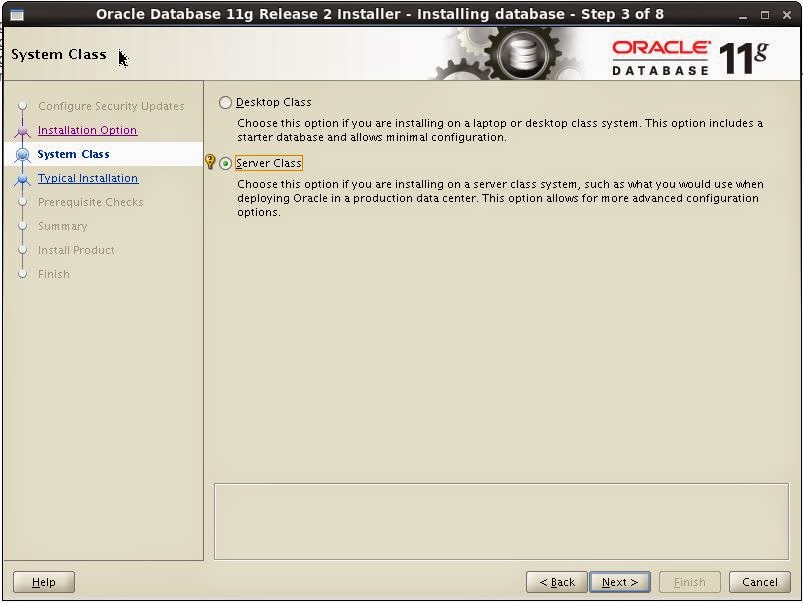
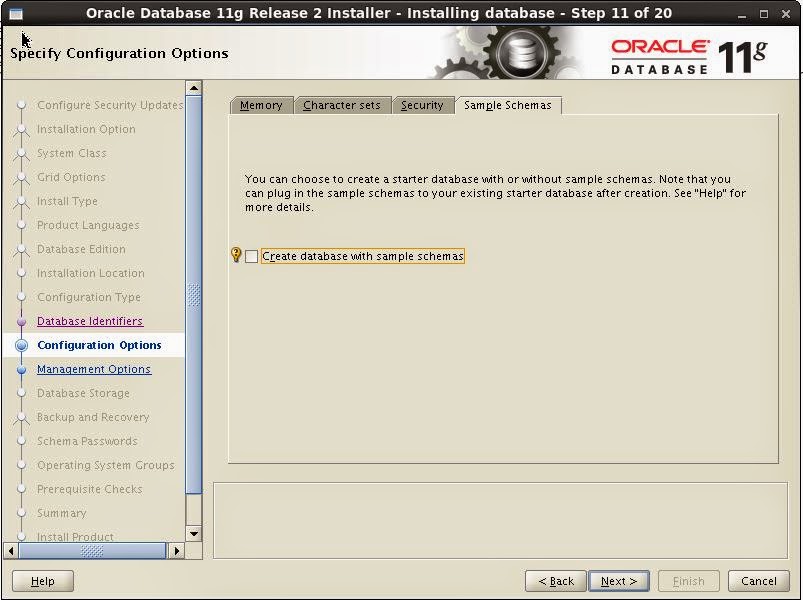
Oracle Database 11gr2 Installation steps